<?xml version="1.0" encoding="utf-8"?><feed xmlns="http://www.w3.org/2005/Atom" ><generator uri="https://jekyllrb.com/" version="3.10.0">Jekyll</generator><link href="https://k2naveen.github.io/feed.xml" rel="self" type="application/atom+xml" /><link href="https://k2naveen.github.io/" rel="alternate" type="text/html" /><updated>2026-06-18T04:50:56+00:00</updated><id>https://k2naveen.github.io/feed.xml</id><title type="html">Naveen Kumar</title><subtitle>Notes on Linux graphics, Wayland, VRR, and display pipelines.</subtitle><entry><title type="html">Enabling async page flip (tearing) in GNOME mutter</title><link href="https://k2naveen.github.io/wayland/tearing/2026/06/18/enabling-async-page-flip-tearing-in-gnome-mutter.html" rel="alternate" type="text/html" title="Enabling async page flip (tearing) in GNOME mutter" /><published>2026-06-18T04:00:00+00:00</published><updated>2026-06-18T04:00:00+00:00</updated><id>https://k2naveen.github.io/wayland/tearing/2026/06/18/enabling-async-page-flip-tearing-in-gnome-mutter</id><content type="html" xml:base="https://k2naveen.github.io/wayland/tearing/2026/06/18/enabling-async-page-flip-tearing-in-gnome-mutter.html"><![CDATA[<p>Tearing support on Wayland sounds simple at first glance: if a client says it
prefers latency over perfect vblank alignment, let the compositor flip the new
buffer immediately with <code class="language-plaintext highlighter-rouge">DRM_MODE_PAGE_FLIP_ASYNC</code>.</p>

<p>In practice, getting that to work in GNOME mutter required changes across the
Wayland protocol layer, compositor policy, Clutter frame scheduling, KMS plane
capability parsing, and the atomic commit path.</p>

<p>This post walks through the mutter branch that adds tearing support,
<code class="language-plaintext highlighter-rouge">wip/add-tearing-support</code>, and explains why the final implementation is more
than just setting one atomic flag.</p>

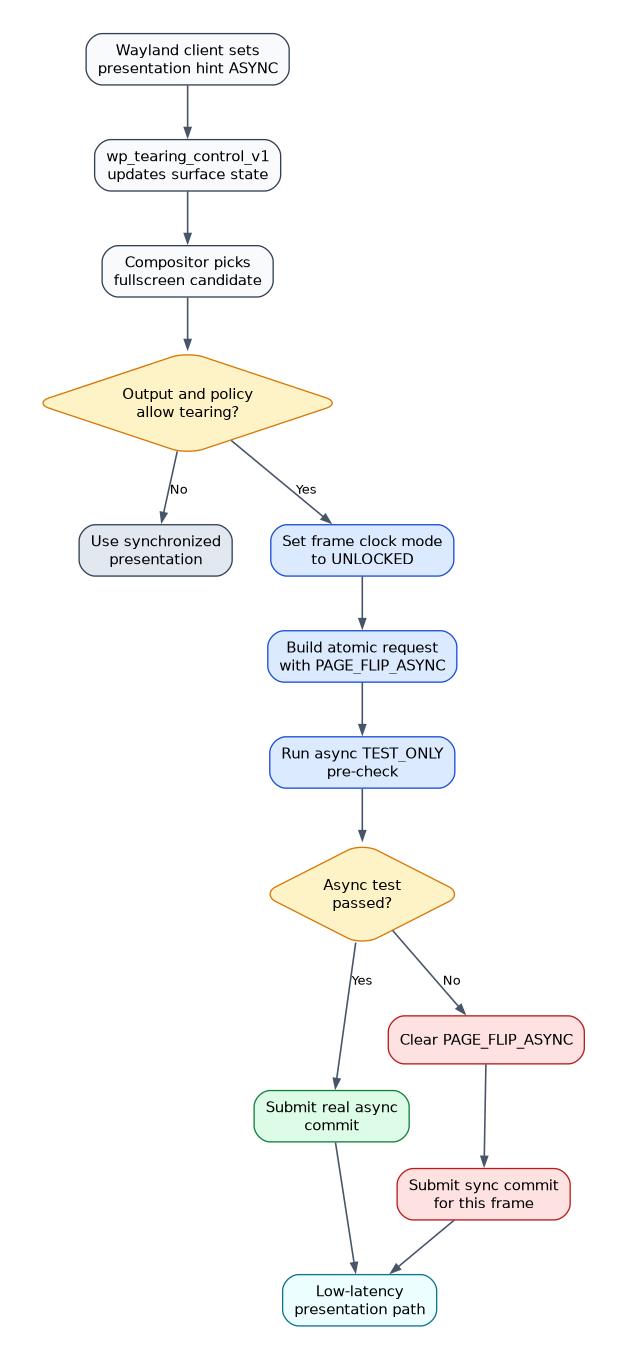
<h2 id="end-to-end-flow">End-to-end flow</h2>

<p><img src="/images/async-page-flip-tearing-flow.png" alt="Async page flip tearing flow" /></p>

<h2 id="what-async-page-flip-changes">What async page flip changes</h2>

<p>With normal presentation, the compositor schedules a frame against the next
refresh deadline and the KMS commit becomes visible on a vblank boundary. That
avoids tearing, but it also means an extra wait if a fullscreen client finishes
rendering just after the compositor has already targeted the current refresh.</p>

<p>Async page flip changes the tradeoff:</p>

<ul>
  <li>submit the new primary plane framebuffer immediately</li>
  <li>let scanout switch mid-frame if needed</li>
  <li>reduce latency for fullscreen content that prefers it</li>
  <li>accept visible tearing as the tradeoff</li>
</ul>

<p>That model only really makes sense when the content owns the whole output and
is not competing with other desktop composition work.</p>

<h2 id="the-protocol-piece-wp_tearing_control_v1">The protocol piece: <code class="language-plaintext highlighter-rouge">wp_tearing_control_v1</code></h2>

<p>The first requirement is a way for Wayland clients to express preference.
The branch adds support for the <code class="language-plaintext highlighter-rouge">wp_tearing_control_manager_v1</code> protocol and a
per-surface <code class="language-plaintext highlighter-rouge">wp_tearing_control_v1</code> object in
<code class="language-plaintext highlighter-rouge">src/wayland/meta-wayland-tearing-control.c</code>.</p>

<p>The protocol is intentionally small. Clients set one of two presentation hints:</p>

<ul>
  <li><code class="language-plaintext highlighter-rouge">ASYNC</code> if they prefer tearing for lower latency</li>
  <li><code class="language-plaintext highlighter-rouge">VSYNC</code> if they prefer normal synchronized presentation</li>
</ul>

<p>On the mutter side this is stored in the pending Wayland surface state as an
<code class="language-plaintext highlighter-rouge">allow_tearing</code> bit, which then gets applied as part of normal surface state
processing.</p>

<p>That is an important design point: the protocol does not force tearing. It only
lets the client opt in.</p>

<h2 id="mutter-policy-only-when-it-is-actually-safe">Mutter policy: only when it is actually safe</h2>

<p>Once the protocol state exists, mutter still needs to decide whether that hint
should affect the output.</p>

<p>The policy in this branch is conservative:</p>

<ul>
  <li>only a fullscreen surface can drive tearing</li>
  <li>the surface must be a Wayland surface</li>
  <li>the output must support atomic async page flip</li>
  <li>hardware cursor handling must not interfere</li>
</ul>

<p>This logic lives in <code class="language-plaintext highlighter-rouge">src/compositor/meta-compositor-view-native.c</code> and
<code class="language-plaintext highlighter-rouge">src/backends/native/meta-onscreen-native.c</code>.</p>

<p>The compositor tracks the current fullscreen actor for each stage view. If the
topmost actor is a fullscreen Wayland surface, mutter checks whether that
surface has tearing enabled and then requests tearing on the onscreen object.
If not, it forces the output back to synchronized presentation.</p>

<p>That means the feature is output-scoped, but driven by the currently eligible
fullscreen surface.</p>

<h2 id="async-is-not-just-a-flag-frame-clock-changes-matter">Async is not just a flag: frame clock changes matter</h2>

<p>If the compositor keeps scheduling work as if presentation must align to
vblank, then enabling async page flip will not buy much latency reduction.</p>

<p>To address that, the branch adds a new Clutter frame clock mode,
<code class="language-plaintext highlighter-rouge">CLUTTER_FRAME_CLOCK_MODE_UNLOCKED</code>, and switches to it whenever tearing is
active.</p>

<p>The key idea is that unlocked mode stops treating the refresh cycle as the
primary scheduling constraint. Instead of pacing frames around the normal
vblank deadline model, the compositor can submit work as soon as it is ready.</p>

<p>In the branch, <code class="language-plaintext highlighter-rouge">meta_onscreen_native_before_redraw()</code> updates the frame clock
mode like this:</p>

<ul>
  <li>tearing enabled -&gt; <code class="language-plaintext highlighter-rouge">UNLOCKED</code></li>
  <li>VRR enabled -&gt; <code class="language-plaintext highlighter-rouge">VARIABLE</code></li>
  <li>otherwise -&gt; <code class="language-plaintext highlighter-rouge">FIXED</code></li>
</ul>

<p>That is one of the most important parts of the series. Without it, the kernel
might accept async flips, but the compositor would still behave like a mostly
vsynced system.</p>

<h2 id="kms-capability-plumbing-async-formats-are-separate">KMS capability plumbing: async formats are separate</h2>

<p>A second non-obvious part is scanout format support.</p>

<p>Some hardware exposes a normal <code class="language-plaintext highlighter-rouge">IN_FORMATS</code> blob for plane formats and
modifiers, but async flips may support only a subset of those combinations.
This branch adds support for <code class="language-plaintext highlighter-rouge">IN_FORMATS_ASYNC</code> on KMS planes and stores a
separate async format/modifier table per plane.</p>

<p>That work lives mainly in <code class="language-plaintext highlighter-rouge">src/backends/native/meta-kms-plane.c</code>.</p>

<p>Why this matters:</p>

<ul>
  <li>a plane may be scanout-capable in general</li>
  <li>but not all formats or modifiers are valid for async flip</li>
  <li>compositor-side validation needs to know the async subset up front</li>
</ul>

<p>Without that separation, mutter could choose a format that works for normal
page flips and only discover much later that async presentation is impossible.</p>

<h2 id="output-policy-cursor-and-direct-scanout-interactions">Output policy: cursor and direct scanout interactions</h2>

<p>Async commits are heavily restricted in the kernel and drivers. In particular,
anything beyond the primary plane update can make an async commit invalid.</p>

<p>This branch handles that in a few ways:</p>

<ul>
  <li>mutter inhibits the hardware cursor when tearing is enabled</li>
  <li>direct scanout and fullscreen candidate selection are tied into the tearing
policy</li>
  <li>async commits are only attempted on paths that are close to pure primary
plane flips</li>
</ul>

<p>That cursor inhibition is especially important. A cursor plane update during a
tearing frame can turn what should be a simple async primary flip into a more
complex atomic transaction that the driver will reject.</p>

<h2 id="making-async-robust-pre-test-and-fallback-to-sync">Making async robust: pre-test and fallback to sync</h2>

<p>The last piece turned out to be essential in practice.</p>

<p>Even when a client is eligible for tearing, not every single frame is safe to
submit asynchronously. During transitions you may still have plane state
changes that are valid for normal commits but not for async ones.</p>

<p>Examples include:</p>

<ul>
  <li>sync to async toggles</li>
  <li>direct scanout handoff transitions</li>
  <li>transient plane state changes that drivers reject for async</li>
</ul>

<p>To make this robust, the branch adds an async pre-test in
<code class="language-plaintext highlighter-rouge">src/backends/native/meta-kms-impl-device-atomic.c</code>:</p>

<ol>
  <li>build the real atomic request</li>
  <li>if <code class="language-plaintext highlighter-rouge">PAGE_FLIP_ASYNC</code> is requested, first issue a <code class="language-plaintext highlighter-rouge">TEST_ONLY</code> async commit</li>
  <li>if the async test fails, clear <code class="language-plaintext highlighter-rouge">PAGE_FLIP_ASYNC</code></li>
  <li>submit the same frame synchronously instead of hard-failing</li>
</ol>

<p>That fallback is what makes repeated sync &lt;-&gt; async switching stable in
practice. The compositor still prefers async when possible, but it does not get
stuck on transient <code class="language-plaintext highlighter-rouge">EINVAL</code> failures from the atomic path.</p>

<h2 id="user-facing-enablement">User-facing enablement</h2>

<p>The branch also adds an experimental mutter feature flag and settings plumbing
for tearing.</p>

<p>The new experimental feature key is <code class="language-plaintext highlighter-rouge">tearing</code> in
<code class="language-plaintext highlighter-rouge">org.gnome.mutter experimental-features</code>, and the branch also wires the state
through <code class="language-plaintext highlighter-rouge">MetaSettings</code> so the compositor can expose and honor it consistently.</p>

<p>At the KMS level, mutter separately checks whether the device advertises
<code class="language-plaintext highlighter-rouge">DRM_CAP_ATOMIC_ASYNC_PAGE_FLIP</code> before trying to use the feature.</p>

<p>So the effective gate is:</p>

<ul>
  <li>feature enabled in mutter</li>
  <li>client opted in through tearing control</li>
  <li>output is fullscreen and eligible</li>
  <li>KMS device supports atomic async page flip</li>
</ul>

<h2 id="why-this-series-ended-up-larger-than-expected">Why this series ended up larger than expected</h2>

<p>The interesting lesson from this work is that tearing support is not really one
feature. It is a chain of smaller requirements that all need to line up:</p>

<ul>
  <li>a client protocol to express preference</li>
  <li>compositor policy for when that preference is honored</li>
  <li>a frame clock mode that does not artificially preserve vblank pacing</li>
  <li>async-specific plane format validation</li>
  <li>KMS commit handling that can fall back gracefully</li>
</ul>

<p>Any one of those missing pieces produces a system that either does not tear
when requested, tears unreliably, or falls over when the frame path changes.</p>

<h2 id="where-the-patches-live">Where the patches live</h2>

<p>The mutter implementation is on this branch:</p>

<ul>
  <li><a href="https://gitlab.gnome.org/naveenk2/mutter/-/commits/wip/add-tearing-support"><code class="language-plaintext highlighter-rouge">naveenk2/mutter:wip/add-tearing-support</code></a></li>
</ul>

<p>The main commits in the series are:</p>

<ul>
  <li><code class="language-plaintext highlighter-rouge">build: Bump libdrm requirement to &gt;= 2.4.120</code></li>
  <li><code class="language-plaintext highlighter-rouge">atomic: Check for atomic tearing capability</code></li>
  <li><code class="language-plaintext highlighter-rouge">settings: Add experimental feature for tearing</code></li>
  <li><code class="language-plaintext highlighter-rouge">wayland: Add support for tearing control protocol</code></li>
  <li><code class="language-plaintext highlighter-rouge">backends/native: Add IN_FORMATS_ASYNC and improve async (tearing) handling</code></li>
  <li><code class="language-plaintext highlighter-rouge">Add unlocked frame clock mode for tearing support</code></li>
  <li><code class="language-plaintext highlighter-rouge">kms/atomic: pre-test async and fallback to sync</code></li>
</ul>

<h2 id="practical-outcome">Practical outcome</h2>

<p>With this branch, mutter can finally honor a fullscreen Wayland client’s
tearing hint in a way that is coherent end to end:</p>

<ul>
  <li>the client opts in through Wayland</li>
  <li>mutter enables tearing only for the right surface and output state</li>
  <li>the frame clock stops artificially holding frames to vblank cadence</li>
  <li>the KMS backend uses async flips when the hardware state really supports it</li>
  <li>and if one frame is not async-safe, mutter falls back to sync instead of
failing the presentation path</li>
</ul>

<p>That combination is what makes tearing support usable rather than merely
present.</p>]]></content><author><name></name></author><category term="wayland" /><category term="tearing" /><category term="wayland" /><category term="tearing" /><category term="mutter" /><category term="gnome" /><category term="kms" /><category term="async-page-flip" /><category term="drm" /><summary type="html"><![CDATA[Tearing support on Wayland sounds simple at first glance: if a client says it prefers latency over perfect vblank alignment, let the compositor flip the new buffer immediately with DRM_MODE_PAGE_FLIP_ASYNC.]]></summary></entry><entry><title type="html">Fixing frame judder with video playback</title><link href="https://k2naveen.github.io/wayland/vrr/2026/05/23/fixing-judder-issue-with-video-playback.html" rel="alternate" type="text/html" title="Fixing frame judder with video playback" /><published>2026-05-23T05:00:00+00:00</published><updated>2026-05-23T05:00:00+00:00</updated><id>https://k2naveen.github.io/wayland/vrr/2026/05/23/fixing-judder-issue-with-video-playback</id><content type="html" xml:base="https://k2naveen.github.io/wayland/vrr/2026/05/23/fixing-judder-issue-with-video-playback.html"><![CDATA[<p>Variable refresh rate displays are great for games, where frame production is
inherently irregular: the panel scans out the moment a frame is ready, so there
is no vsync stutter and no input lag from holding a frame back to the next
refresh boundary. For video playback the situation is different. A 24 fps
movie produces frames at a perfectly fixed cadence; the question is just what
the panel does in between them.</p>

<p>On a 40-120 Hz VRR panel I noticed unmistakable judder when playing 24 fps
content in mpv on Wayland. 50 fps content looked fine. This post walks through
how the problem manifests in the KMS layer, what the missing piece is, and how
a small Wayland protocol plus a low-frame-cadence path in mutter fix
it.</p>

<h2 id="what-judder-looks-like-in-the-kms-log">What judder looks like in the KMS log</h2>

<p>mutter has a debug topic that logs the last four observed present intervals
per CRTC. With <code class="language-plaintext highlighter-rouge">MUTTER_DEBUG_TOPICS=kms</code> enabled, playing the 24 fps clip on
the unpatched stack produces lines like:</p>

<div class="language-plaintext highlighter-rouge"><div class="highlight"><pre class="highlight"><code>KMS_DEADLINE: CRTC 149 VRR present intervals { 8333, 16667, 8333, 16667 }  → min 8333 µs
KMS_DEADLINE: CRTC 149 VRR present intervals { 16667, 8333, 16667, 16667 } → min 8333 µs
KMS_DEADLINE: CRTC 149 VRR present intervals { 33332, 16669, 16663, 16670 } → min 16663 µs
KMS_DEADLINE: CRTC 149 VRR present intervals { 16664, 33333, 16671, 16663 } → min 16663 µs
KMS_DEADLINE: CRTC 149 VRR present intervals { 25002, 24999, 25001, 16664 } → min 16664 µs
</code></pre></div></div>

<p>Those are scanout intervals in microseconds. 8333 µs is 120 Hz, 16667 µs is
60 Hz, 25000 µs is 40 Hz, 33333 µs is 30 Hz. For 23.976 fps content the
nominal frame interval is <strong>41 708 µs</strong>, but the actual presents wander all
over the 40–120 Hz VRR window.</p>

<p>That wander is exactly what the eye picks up as judder. Each video frame is
held for an arbitrary number of scanout periods until the next frame is ready,
and the period itself is not stable.</p>

<h2 id="why-the-compositor-cant-fix-this-on-its-own">Why the compositor can’t fix this on its own</h2>

<p>VRR works in the direction of <em>latency</em>: as soon as a frame arrives, scan it
out. The panel firmware also enforces a minimum refresh rate (40 Hz here) by
re-sending the last line when nothing has arrived in a while. So at 24 fps,
between two real frames there is <em>always</em> at least one self-refresh from the
panel — and the exact moment it happens depends on when the compositor’s frame
clock decides to wake up. The compositor has no idea the client intends to
post frames at a fixed 23.976 Hz cadence, so it cannot align anything.</p>

<p>The fix is to tell the compositor what cadence the client is producing.</p>

<h2 id="the-content-frame-rate-v1-protocol">The <code class="language-plaintext highlighter-rouge">content-frame-rate-v1</code> protocol</h2>

<p>A new Wayland protocol,
<a href="https://gitlab.freedesktop.org/NaveenKumar/wayland-protocols/-/commit/f3b2ed2c49a9bdb4419b70baab1f0e0af097d259"><code class="language-plaintext highlighter-rouge">wp_content_frame_rate_v1</code></a>, lets a client
attach a rational frame rate (numerator / denominator) to a surface. The
compositor is free to use that hint to schedule its frame clock and, more
importantly, to retune the panel.</p>

<p>Three components needed changes:</p>

<ol>
  <li><strong>wayland-protocols</strong> – the XML for the protocol.</li>
  <li><strong>mpv</strong> – bind the manager, create a per-surface object, and call
<code class="language-plaintext highlighter-rouge">set_frame_rate</code> whenever the video track’s container FPS changes.</li>
  <li><strong>mutter</strong> – receive the hint, plumb it from the Wayland surface state into
<code class="language-plaintext highlighter-rouge">MetaOnscreenNative</code>, and compute a <em>virtual</em> refresh mode for the CRTC.</li>
</ol>

<p>The mutter side is where the interesting logic lives.</p>

<h2 id="low-frame-cadence-in-mutter">Low Frame Cadence in mutter</h2>

<p>When VRR is on and the client supplies a content frame rate, mutter computes:</p>

<div class="language-plaintext highlighter-rouge"><div class="highlight"><pre class="highlight"><code>content_fps = numerator / denominator
vrr_min_hz  = 1_000_000 / max_refresh_interval_us
N           = max(ceil(vrr_min_hz / content_fps), 1)
target_hz   = content_fps * N
</code></pre></div></div>

<p><code class="language-plaintext highlighter-rouge">N</code> is the smallest integer multiplier that brings the content rate up to (or
above) the panel’s VRR floor. If the resulting <code class="language-plaintext highlighter-rouge">target_hz</code> lies within
<code class="language-plaintext highlighter-rouge">[vrr_min, vrr_max]</code>, mutter clones the current KMS mode and rewrites
<code class="language-plaintext highlighter-rouge">vtotal</code>, <code class="language-plaintext highlighter-rouge">vsync_start</code>, <code class="language-plaintext highlighter-rouge">vsync_end</code>, and <code class="language-plaintext highlighter-rouge">vrefresh</code> so that the panel scans
out at exactly <code class="language-plaintext highlighter-rouge">target_hz</code>. From that point on every video frame is displayed
for <code class="language-plaintext highlighter-rouge">N</code> scanout periods of fixed length.</p>

<p>For the two cases tested:</p>

<table>
  <thead>
    <tr>
      <th>content fps</th>
      <th>VRR window</th>
      <th>N</th>
      <th>target</th>
      <th>result</th>
    </tr>
  </thead>
  <tbody>
    <tr>
      <td>49.984</td>
      <td>40–120 Hz</td>
      <td>1</td>
      <td>49.984 Hz</td>
      <td>content rate matches scanout 1:1</td>
    </tr>
    <tr>
      <td>23.976</td>
      <td>40–120 Hz</td>
      <td>2</td>
      <td>47.952 Hz</td>
      <td>each frame shown for two scanouts</td>
    </tr>
  </tbody>
</table>

<p>The <code class="language-plaintext highlighter-rouge">N=2</code> row is the actual fix for the judder I started with.</p>

<h2 id="tracing-the-patched-stack">Tracing the patched stack</h2>

<p>To verify each link of the chain I added <code class="language-plaintext highlighter-rouge">MP_VERBOSE</code> logs in mpv and
<code class="language-plaintext highlighter-rouge">meta_topic(META_DEBUG_KMS, ...)</code> / <code class="language-plaintext highlighter-rouge">META_DEBUG_WAYLAND</code> logs in mutter. Then
I played the same 23.976 fps clip:</p>

<p>mpv (<code class="language-plaintext highlighter-rouge">-v</code> plus <code class="language-plaintext highlighter-rouge">WAYLAND_DEBUG=1</code>):</p>

<div class="language-plaintext highlighter-rouge"><div class="highlight"><pre class="highlight"><code>-&gt; wl_registry#2.bind(38, "wp_content_frame_rate_manager_v1", 1, new id #29)
-&gt; wp_content_frame_rate_manager_v1#29.get_surface_content_frame_rate(..., wl_surface#5)
-&gt; wp_content_frame_rate_v1#39.set_frame_rate(24000, 1001)
</code></pre></div></div>

<p>mutter (<code class="language-plaintext highlighter-rouge">MUTTER_DEBUG_TOPICS=wayland,kms</code>, captured from the journal):</p>

<div class="language-plaintext highlighter-rouge"><div class="highlight"><pre class="highlight"><code>content-frame-rate: surface=5 set_frame_rate 24000/1001 (23.976 fps)
KMS: LFC virtual refresh target 47.952 Hz (content 24000/1001, N=2)
KMS: Setting CRTC (149) virtual refresh mode to 47.952 Hz
KMS: [atomic] Setting CRTC 149 (/dev/dri/card1) property 'VRR_ENABLED' to 1
</code></pre></div></div>

<p>And, the payoff, the KMS deadline topic after the mode switch settles:</p>

<div class="language-plaintext highlighter-rouge"><div class="highlight"><pre class="highlight"><code>KMS_DEADLINE: CRTC 149 VRR present intervals { 20829, 20834, 20836, 20838 }  → min 20829 µs
KMS_DEADLINE: CRTC 149 VRR present intervals { 20834, 20833, 20838, 20829 }  → min 20829 µs
KMS_DEADLINE: CRTC 149 VRR present intervals { 20833, 20838, 20829, 20834 }  → min 20829 µs
</code></pre></div></div>

<p>Every present interval is within ±5 µs of 20 833 µs, which is exactly half the
24 fps frame interval. The panel is now scanning out at a perfectly steady
47.952 Hz and the player is delivering one new frame every other scanout.</p>

<p>For the 49.984 fps clip the equivalent capture shows the panel locked at
~50 Hz (20 000 µs ±10 µs) for the entire playback window.</p>

<h2 id="lifecycle">Lifecycle</h2>

<p>Closing mpv between clips emits the expected teardown:</p>

<div class="language-plaintext highlighter-rouge"><div class="highlight"><pre class="highlight"><code>KMS: [atomic] Setting CRTC 149 ... property 'VRR_ENABLED' to 0
</code></pre></div></div>

<p>Opening the next clip re-establishes the hint and re-enables VRR + virtual
mode with whatever new <code class="language-plaintext highlighter-rouge">N</code> is appropriate for the new content rate. No
manual configuration, no user-visible mode change.</p>

<h2 id="visual-result">Visual result</h2>

<p>Judder is gone for the 24 fps case. The 50 fps case, which was already
acceptable, now scans out at exactly the content rate rather than relying on
whatever cadence the frame clock happened to converge to. Cursor movement and
desktop animations remain VRR (they’re driven by the regular frame clock,
which is what the <code class="language-plaintext highlighter-rouge">MODE_VARIABLE</code> clutter mode is for).</p>

<h2 id="where-the-patches-live">Where the patches live</h2>

<ul>
  <li><a href="https://gitlab.freedesktop.org/NaveenKumar/wayland-protocols/-/commit/f3b2ed2c49a9bdb4419b70baab1f0e0af097d259"><code class="language-plaintext highlighter-rouge">wayland-protocols XML</code></a> – <code class="language-plaintext highlighter-rouge">0001-add-content-frame-rate-protocol-v1.patch</code></li>
  <li><a href="https://github.com/k2naveen/mpv/commits/test-content-refresh-rate/"><code class="language-plaintext highlighter-rouge">mpv</code></a> – <code class="language-plaintext highlighter-rouge">video/out/wayland_common.c</code>, <code class="language-plaintext highlighter-rouge">player/misc.c</code>, <code class="language-plaintext highlighter-rouge">video/out/vo.h</code></li>
  <li><a href="https://gitlab.gnome.org/naveenk2/mutter/-/commits/test-content-frame-rate"><code class="language-plaintext highlighter-rouge">mutter</code></a> – <code class="language-plaintext highlighter-rouge">src/wayland/meta-wayland-content-frame-rate.c</code>, plumbing through
<code class="language-plaintext highlighter-rouge">meta-wayland-surface.c</code>, and the LFC path in
<code class="language-plaintext highlighter-rouge">src/backends/native/meta-onscreen-native.c</code> plus
<code class="language-plaintext highlighter-rouge">src/backends/native/meta-crtc-kms.c</code> / <code class="language-plaintext highlighter-rouge">meta-kms-mode.c</code></li>
</ul>

<p>If you have a wide-range VRR panel and a low-fps clip handy, the same logging
above is enough to confirm the chain end to end on your own setup.</p>]]></content><author><name></name></author><category term="wayland" /><category term="vrr" /><category term="wayland" /><category term="vrr" /><category term="mutter" /><category term="mpv" /><category term="kms" /><category term="content-frame-rate" /><summary type="html"><![CDATA[Variable refresh rate displays are great for games, where frame production is inherently irregular: the panel scans out the moment a frame is ready, so there is no vsync stutter and no input lag from holding a frame back to the next refresh boundary. For video playback the situation is different. A 24 fps movie produces frames at a perfectly fixed cadence; the question is just what the panel does in between them.]]></summary></entry></feed>